Company data isolationDatabase-enforced separation between every workspace.
Role-aware accessOwners, office users, managers, and employees get focused access.
Protected financial accessMFA is required for privileged accounting permissions.
Private documentsReceipts and attachments use tenant-checked private storage.
One connected workspace
See your customers, work, inventory, and finances in one place.
Orderly connects the records behind the business, so everyone works from the same current information.
01
Win the work
Keep customers, quotes, line items, due dates, and approvals together. Convert an accepted quote into a job without retyping it.
02
Run the work
Assign jobs, track time and mileage, issue materials, record expenses, and keep the current status visible to the people doing the work.
03
See the result
Invoice customers, record deposits and payments, pay suppliers, and understand open balances, cash activity, and job profitability.
Actual Orderly screens
See Orderly in action.
Explore real screens from two example companies: a residential contractor and an independent coffee shop.
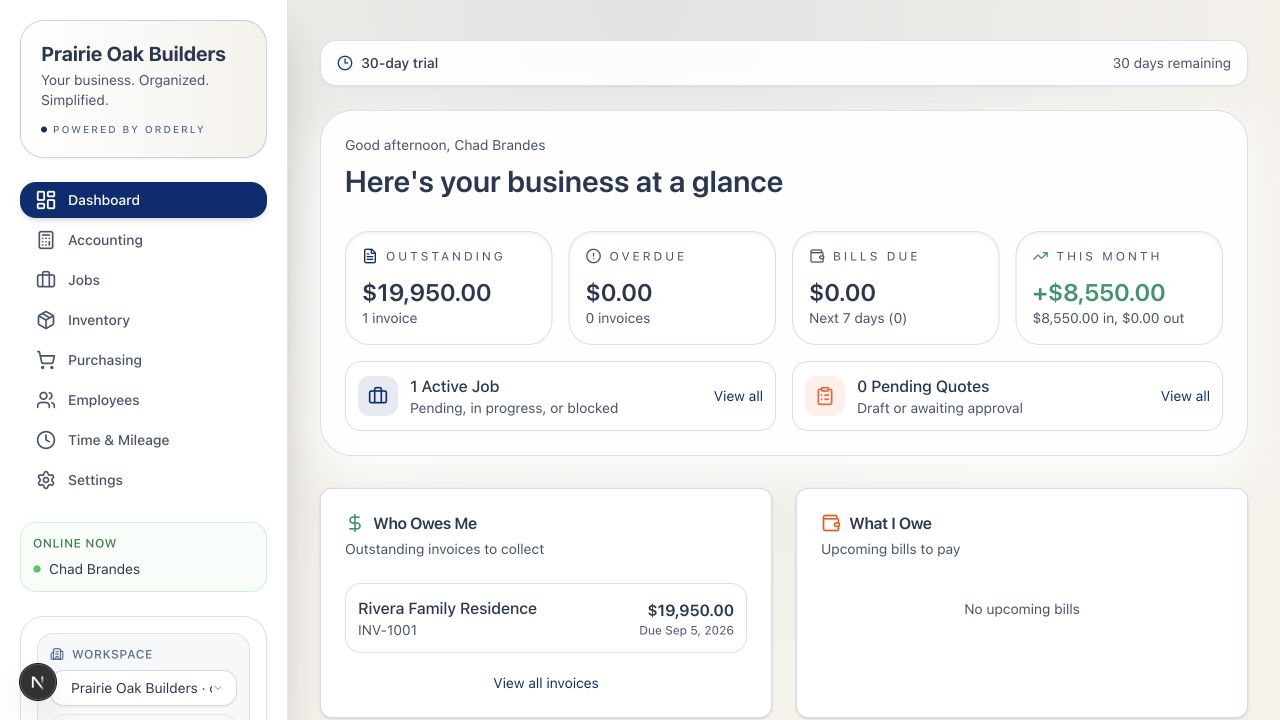
Owner overviewThe numbers and work that need attention, first.
Orderly
What Orderly does
One place for the work that runs your business.
$
Sales & customers
Move from a customer conversation to collected cash with connected records.
Customers, contacts, terms, and billing details
Quotes with job or invoice conversion
Invoices, deposits, and payments
Accounts receivable and customer balances
✓
Jobs & field work
Keep the work, the people, and the costs tied to the same job.
Work orders, status, priority, and assignments
Time, breaks, mileage, and approvals
Materials, expenses, and revenue by job
Job cost and gross-profit reporting
□
Inventory & know-how
Track physical items and preserve the instructions behind what your team makes.
Item catalog, part numbering, and CSV import
Locations, levels, transfers, and history
Receive, issue, adjust, and link stock to jobs
Versioned team recipes, procedures, and cost
↗
Purchasing & suppliers
Follow material and supplier commitments from order through payment.
Vendors, terms, contacts, and balances
Purchase orders, PDF, and email delivery
Partial or complete inventory receiving
PO-to-bill conversion and vendor payments
◷
People & daily activity
Give the team a focused place to record work and find what they need.
Employee records and additive access roles
Fast, scoped employee PIN sign-in
Clock, manual time, review, and rejection reasons
Receipts, mileage, and payroll-ready exports
≋
Financial clarity
Start with straightforward business summaries and add journal accounting when needed.
Cash income, expense, receivable, and payable summaries
Optional chart of accounts and balanced journals
Profit-and-loss, balance sheet, and ledger readiness
Job costing and retained source documents
↳
Setup & data
Sign up with an email and password, pick the tools you want to see, and start working.
Self-service 30-day, no-card trial
Choose your tools at first login; change them anytime
Hidden tools stay available, nothing is locked away
Customer, vendor, item, and account imports when you need them
◎
Documents & control
Keep supporting records protected and give each person the access their work requires.
Private receipts and bill attachments
Tenant-isolated database access
MFA-gated financial permission packs
Server-recorded audit events for sensitive actions
Explore the full platform
Choose the tools your business needs.
Start with what matters today. Every capability stays available as your business changes.
Workspace & setup
Self-service 30-day trial
Email-and-password signup
Choose the tools you see; change them anytime
Optional setup checklist
Customer, vendor, item, and account imports
Access to multiple business workspaces
Customers & sales
Customer contacts, terms, tax status, rates, and notes
Quote lifecycle and line items
Quote-to-job and quote-to-invoice conversion
Invoices, deposits, payments, and open balances
Customer balance reporting
Jobs & field work
Work orders, assignments, priorities, dates, and status
Clocked and manual time with breaks
Mileage linked to jobs
Job materials, expenses, and revenue
Labor, material, mileage, expense, and gross-profit reporting
Inventory & locations
Catalog, part-number ranges, units, cost, and CSV import
Multiple stock locations
Receive, issue, transfer, and adjust operations
Numbered history and job linkage
Negative-stock prevention by default
Recipes & procedures
Ingredients, quantities, units, yield, and instructions
Optional ingredients and version history
Material cost for authorized users
Phone-friendly team reference
Manual reference today; no automatic POS consumption
Purchasing & payables
Vendor records, terms, contacts, and balances
Purchase orders with PDF and email delivery
Partial and complete receiving
PO-to-bill conversion
Bills, private attachments, payments, and due dates
Receipt-backed direct expenses
Employees & approvals
Employee profiles, roles, pay data, status, and assignments
Office login and focused employee PIN access
Additive accounting access protected by MFA
Approve or reject completed time with employee-visible reasons
Controlled profile-change review
Payroll-ready time, mileage, and pay exports
Financial management
Simple cash-oriented summaries
Optional chart of accounts and journal accounting
Balanced manual and source-linked entries with void history
Profit-and-loss and balance sheet
Approval thresholds and fiscal-year settings
Ledger readiness and retained-source checks
Current integrations: Orderly does not currently connect directly to point-of-sale systems, bank feeds, payroll providers, or ecommerce platforms. Recipe consumption is also manual today.
Flexible by design
Designed to fit the way your business works.
Orderly supports businesses that manage customers, jobs, inventory, purchasing, employees, or financial records. Show only the tools you use, and change that at any time.
Orderly is built for businesses that manage connected workflows involving customers, work, people, inventory, suppliers, or finances. It can support service, repair, manufacturing, distribution, retail, food service, and professional or project-based businesses.
Do unused features disappear?
You can simplify the everyday navigation, but the underlying tools remain available. You choose which tools to show at first login and can change that in Settings at any time; nothing is locked away.
Does Orderly replace my accountant or point-of-sale system?
No. Orderly organizes the operational and financial records around the business. Journal-based reporting is optional, and retail ingredient consumption still belongs with a reliable POS integration rather than manual worker entry.
Can employees use it from a phone?
Yes. The responsive workspace supports focused employee access for assigned work, time, mileage, expenses, and reference information such as recipes.
What happens after the trial?
Early adopters can continue using Orderly for $39.99 per month after the free 30-day trial. No card is required to start. Payment setup is being finalized and will be arranged separately before billing begins.
How is company and employee access protected?
Every workspace is isolated at the database layer. The application also enforces role and capability checks, scoped employee PIN sessions, private document access, rate limits, audit recording, and MFA for privileged financial access.